Running Android automation with physical devices can quickly become complicated. You need smartphones, cables, chargers, storage space, maintenance, and a way to manage everything as your operation grows.
GemAutomate Phone Cloud offers a simpler alternative.
With Phone Cloud, you can rent real Android devices remotely and use them for Android automation, app testing, gaming, and other Android-based workflows — without having to purchase and maintain the physical device yourself.
What Is GemAutomate Phone Cloud?
GemAutomate Phone Cloud is a cloud-based phone rental service that gives you remote access to real Android devices.
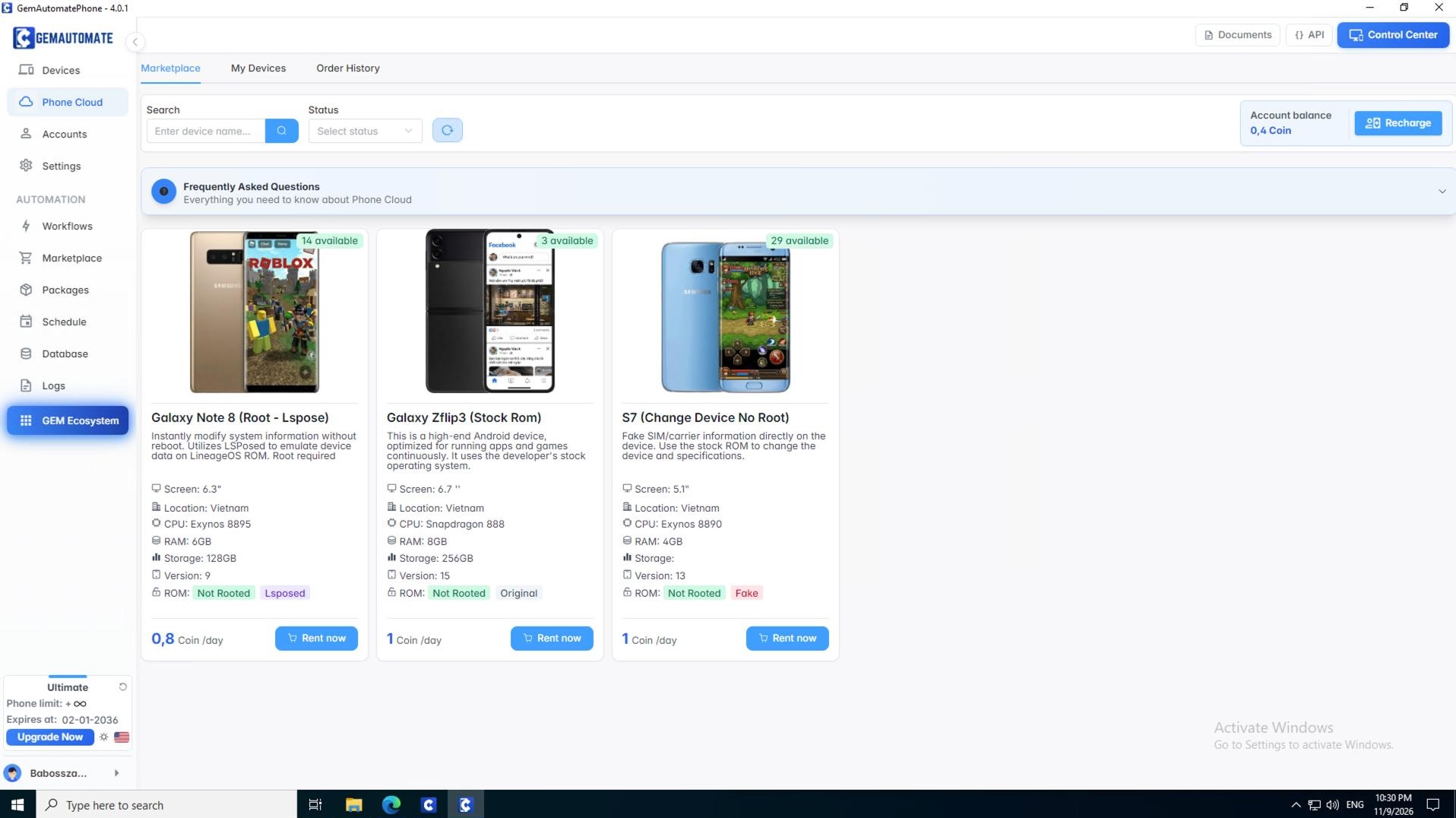
Simply choose an available device from the Phone Cloud marketplace, select your rental period, and get remote access through the GemAutomate platform.
Available rental periods can include:
- 1 day
- 7 days
- 1 month
This makes Phone Cloud useful for both short-term projects and longer-term Android automation workflows.
Real Android Devices, Available Remotely
Unlike solutions that rely only on Android emulators, GemAutomate Phone Cloud provides access to real Android devices.
You can use these devices for:
- Android automation
- App testing
- Mobile workflows
- Gaming
- Remote Android access
- Other Android-based tasks
You don’t need to keep the physical phone on your desk. The device can be accessed remotely through the platform.
Why Use a Cloud Phone?
Reduce Hardware
Physical Android devices require chargers, cables, electricity, storage, and maintenance.
With cloud phone rental, you can rent a device when you need it instead of continuously purchasing additional smartphones.
Scale More Easily
As your automation operation grows, adding more physical phones can become difficult to manage.
Cloud Phone gives you another way to expand your Android automation environment without filling your workspace with additional hardware.
Work Remotely
Because the device is accessible remotely, you can manage your Android environment without physically handling the smartphone.
This makes cloud phone automation a flexible option for users, teams, and businesses working with Android workflows.
Rooted and Not Rooted Devices
GemAutomate Phone Cloud offers different device configurations depending on your requirements.
Rooted devices provide full system access for advanced modifications and applications that require root access.
Not Rooted devices maintain standard Android security and can be suitable for normal app testing and workflows where root detection may be important.
Original, LSPosed, and Fake ROM
Phone Cloud also supports different ROM configurations.
Original ROM uses the stock manufacturer ROM without modifications.
LSPosed ROM uses the LSPosed framework for device modifications without requiring a traditional reboot and requires root access.
Fake ROM allows device information to be modified to emulate different phone models.
These options allow you to choose a device configuration that fits your workflow.
Cloud Phone Automation Made Simpler
Traditional Android automation can look like:
Physical Phones → Cables → Chargers → Device Management → Automation
With GemAutomate Phone Cloud:
Cloud Phone → Connect → Configure → Automate
The goal is simple: reduce unnecessary hardware and make your Android automation environment more flexible.
How Does Cloud Phone Rental Work?
Getting started is simple:
- Open the Phone Cloud marketplace.
- Choose an available Android device.
- Select your rental duration.
- Add balance if necessary.
- Complete the rental.
- Access your device remotely.
You can also manage your rented devices through the My Devices section.
Proxy and Device Management
GemAutomate Phone Cloud also provides options for configuring proxy information according to your workflow requirements.
You can also change your Cloud Phone device through the platform when you need a different available device or configuration.
When your rental period expires, the device is automatically released. Make sure to back up important data before expiration, or extend the rental from My Devices if you need to continue using it.
Frequently Asked Questions
What is GemAutomate Phone Cloud?
GemAutomate Phone Cloud is a cloud-based phone rental service that provides remote access to real Android devices.
Can I use Phone Cloud for Android automation?
Yes. Phone Cloud can be used for Android automation, app testing, gaming, and other Android-based workflows.
Are the Cloud Phones real Android devices?
Yes. GemAutomate Phone Cloud provides access to real Android devices that can be controlled remotely.
How long can I rent a Cloud Phone?
Available rental periods include options such as 1 day, 7 days, and 1 month, depending on the device.
What happens when my rental expires?
The device is automatically released when the rental period ends. You should back up important data before expiration. You can also extend your rental from My Devices before it expires.
Do I need to buy a physical Android phone?
No. You can rent and remotely access an Android device through GemAutomate without purchasing the physical device yourself.
Summary
GemAutomate Phone Cloud provides a flexible way to access real Android devices remotely without the cost and maintenance of owning additional physical hardware.
Whether you need a device for Android automation, cloud phone automation, app testing, gaming, or other mobile workflows, you can choose a device, select your rental period, and get started remotely.
Less hardware. Less maintenance. More flexibility.
Your automation doesn’t have to be limited by the number of phones on your desk.
🚀 Reach Out to Us
Have questions about GemAutomate Phone Cloud, cloud phone rental, or Android automation?
Reach out to us through the following channels:
Official Website:
https://gemautomate.com
Telegram Community:
https://t.me/GemAutomate_Community
YouTube:
https://www.youtube.com/@GemAutomate
Ready to explore GemAutomate Phone Cloud?
Choose your Android device, select your rental period, and start working remotely.
Download GemAutomate: No-Code Automation for MMO, Ad Farming & Social Tasks